If you use Timetable (E10), you can access its help articles here
Introduction
This guide explains how timetable uses your school's structure, period structure, rooms, students & groups, staff and classes to build a timetable draft. Understand what happens when they change and how to safely update, duplicate, and refine your timetable. It also covers lesson states -Lock, Update and Default and how they affect scheduling.
TABLE OF CONTENTS
Tailor Your Timetable
Once you generate a draft timetable, it is linked to the resources set up in the draft at that time - My school year, Rooms, Groups, Staff, Classes and Subjects.
Changing or deleting these resources after generation can cause:
- Broken or invalid lesson placements
- Missing or unassigned periods
- Teacher, room or student clashes
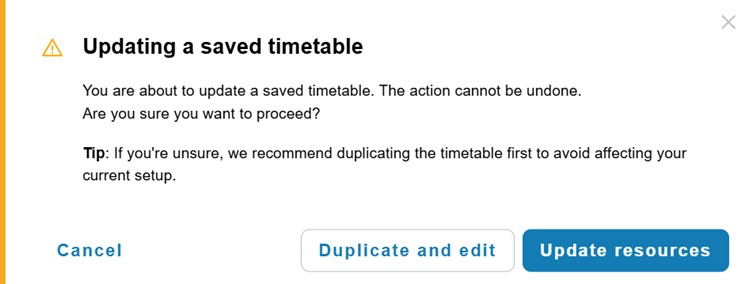
When you attempt to update any setup after a timetable has been generated, you will see a warning. You can choose to:
- Cancel – Keep the current timetable unchanged
- Duplicate and edit – Create a safe copy so you can modify the timetable and its related resources without affecting your live version
- Update resources - Apply your changes knowing the timetable may no longer function as expected
Each lesson in your draft timetable has a state that you can adjust during refinement.
How to safely make updates to lessons in timetable draft
- From Timetable builder, select Actions then Edit
- Select Update resources to continue improving your draft or
- Select Duplicate and edit to avoid altering your current set up
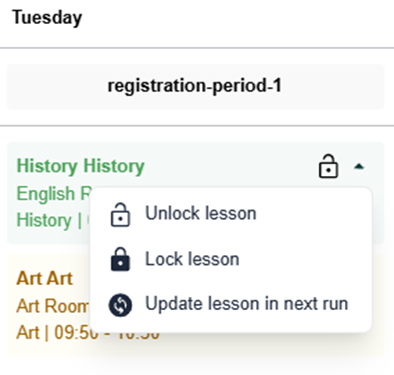
- To improve your draft, after selecting Update resources, and Edit click the padlock icon on a lesson within your timetable to change its current state
Lesson states
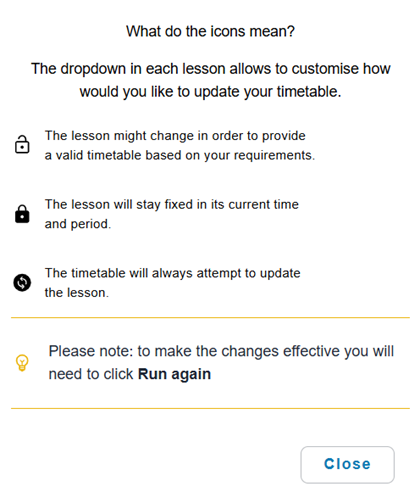
- Lock – Use this for placements you are happy with and want to keep fixed
- Update – Mark lessons you want the system to reschedule
- Default (Unlocked) – Lessons the system may move if needed

Up next
Was this article helpful?
That’s Great!
Thank you for your feedback
Sorry! We couldn't be helpful
Thank you for your feedback
Feedback sent
We appreciate your effort and will try to fix the article