If you use Timetable (E10), you can access its help articles here
Introduction
Once your timetable has been published, you can share it with teachers and students. Select the recipients, then send the timetable so each person receives an email link to view their own personal timetable.
TABLE OF CONTENTS
- Summary: Share a published timetable with teachers and students
- Before you start
- Steps
- What happens next
Before you start
- Make sure the timetable is published.
- Check that recipients have a valid email address on their profile.
- If changes need to be made, make this within your MIS/SIS
Share a published timetable
- Select recipients. Tick the box next to a name to choose one-person, multiple people, or select everyone.
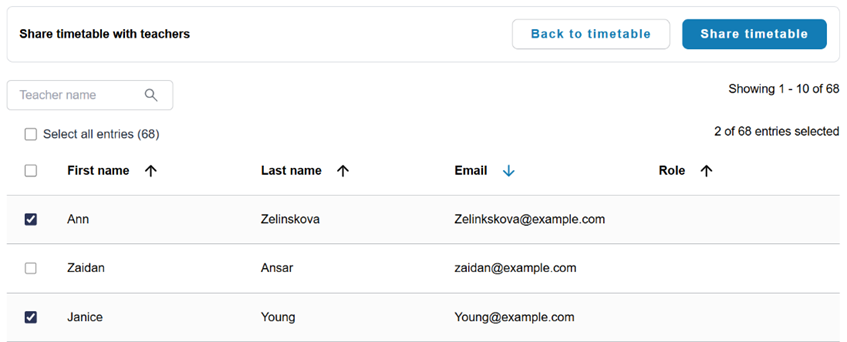
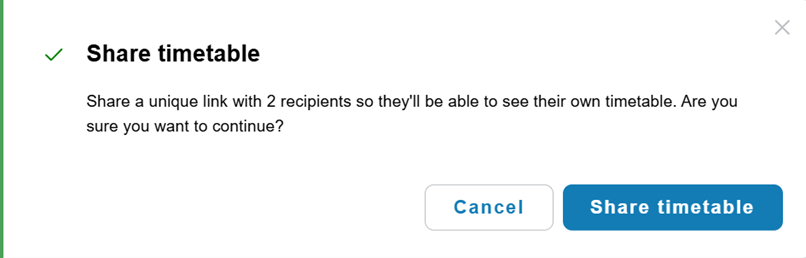
- Send the timetable. When you have selected all recipients, click Share timetable to confirm.
What happens next
Each recipient will receive an email containing a unique link. When they open the link, they will see their own personal timetable.
Note: You can share draft timetable with school staff and leaders, ensure that they have view-only access in permissions.
Was this article helpful?
That’s Great!
Thank you for your feedback
Sorry! We couldn't be helpful
Thank you for your feedback
Feedback sent
We appreciate your effort and will try to fix the article