If you use Timetable (E10), you can access its help articles here
Introduction
To set up the structure of the school day in a draft timetable, you'll be asked to choose between Teaching Time and Set Periods, with each option supporting different timetable requirements.
- Teaching Time is intended for schools that use a single timetable grid across all year groups. Usually for schools who have morning and afternoon sessions.
- Set Periods offers greater flexibility, allowing multiple timetable structures, year group allocation, free period configuration, and support for multi-grid timetables.
IN THIS ARTICLE
Before you start
Depending on the school, a typical school day is made up of:
- registration periods for home room and roll call time
- periods or sessions for teaching lessons or free time
- breaks for lunch, recess, etc.
Set up a single-grid with the teaching time structure
To set up a teaching time single-grid structure in a timetable draft, go to Drafts and Add new draft or open a draft:
- Give your timetable a name.
- Select the academic year for this draft timetable.
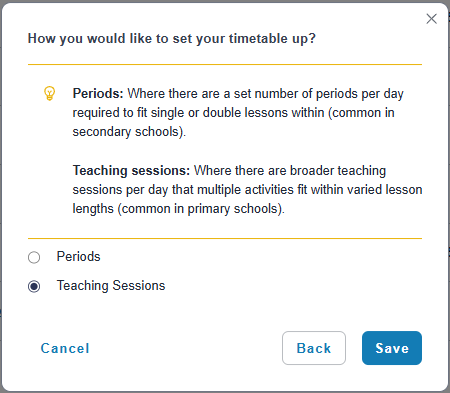
- When prompted, select Teaching Sessions.
- Select Save.
- On the lefthand panel, go to Period Structure.
- Click Add a new Period Structure.
- Type a name for your new structure.
- Select Next.
- Use the dropdown to select when the timetable should repeat to set the timetable cycle.
- Select Next.
- Use the dropdowns to set the start and end times of the school day and registration (homeroom or roll call) period.
- Select Add another to add start and end times for another registration period.
- Select Next.
- Use the dropdowns to set the start and end times for any lunch or breaks times.
- Select Add another to add start and end times for any other breaks in the day.
- Select Save.
The following options are not available in Teaching Time drafts:
- Additional Period Structures.
- Multi-Grid.
- Year Group assignment.
- Free Period configuration.
Up next
- Set up the structure of the school day - Period Structure
- Generate a timetable draft
- Preview and publish your timetable
Was this article helpful?
That’s Great!
Thank you for your feedback
Sorry! We couldn't be helpful
Thank you for your feedback
Feedback sent
We appreciate your effort and will try to fix the article